Friday, 2 September 2016

Digital Marketing Models: 4Cs for marketing communications

How to use the 4Cs to refine your value proposition

The 4Cs (Clarity, Credibility, Consistency, Competitiveness) is most often used in marketing communications and was created by David Jobber and John Fahy in their book ‘Foundations of Marketing’ (2009). Once a business has segmented its marketing and identified the target audience, the next stage is to position the business. To successfully achieve this, the 4Cs is a useful tool to create a positioning statement or to build an online value proposition.

What are the 4Cs?

Marketing 4Cs

The 4Cs are designed to help you think about your value proposition.

To understand how this works in practice, I’ve looked at four well-known companies and what’s interesting is that their slogans all meet the rules of Clarity, Credibility and Consistency. The Competitiveness element is less clear. And I am not sure how you would convey competitiveness with luxury brands.

value propositions 4Cs

Some UK supermarkets do address the Competitiveness element, for example: Morrisons’ slogan is ‘Love it cheaper’  and Sainsbury’s slogan is ‘Live well for less’. It seems when the competitiveness element is included, it’s about price, although it could also be about performance in B2B firms such as technology. Competitiveness is also about levels of customer service, such as Avis’s slogan (until 2012) ‘We try harder’.

For more discussion of how digital marketing models can inform marketing, download our free guide from Annmarie Hanlon. You can also read this case study showing three integrated marketing campaign examples.


from Blog – Smart Insights http://www.smartinsights.com/marketing-planning/marketing-models/digital-marketing-models-4cs-marketing-communications/

via Tumblr http://euro3plast-fr.tumblr.com/post/149830231354

Thursday, 1 September 2016

What are the most popular activities on digital devices? [#ChartoftheDay]

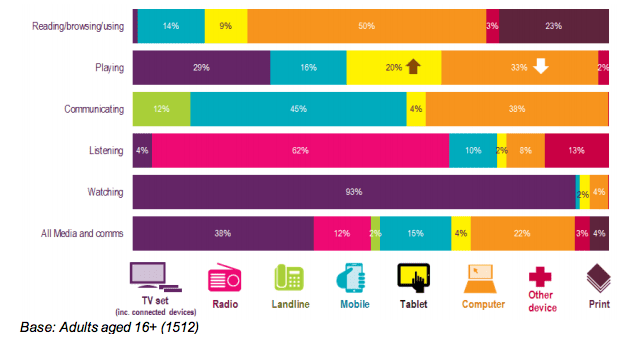
38% of our interactions with all media and communications still occurs in front of a TV. But what else do we do with our devices?

Ofcom has just released their yearly Communications Market Report, where they analyse the UK communications sector.

The report sheds light on many aspects of how we use digital media and technology today, but one chart that stood out to me (not just because of the colours) was Fig 1.12 which showcases the proportion of time attributed to activity types, by device.

Proportion of time attributed to activity types, by device

One thing to point out about this chart: is that it is an average across all age ranges. So these will vary within different age groups. As a reference point, Ofcom have researched behaviour for each of the sections in Fig 1.4.4 if you’re curious to delve a little deeper.

The first point which stands out for me is the big share computer has when reading/browsing/using. With 50% it stands as by far and away the most popular device for reading the news, online shopping and researching etc. This throws up a bit of a question mark around Google’s “Mobile First” thought process, however as the results from this research take into account the working day, I guess this explains the large percentage share. What was also interesting, is the amount of time spent on print, whether this is through newspapers or magazines.

The “communicating” section also brought up some interesting results. None-more so than the continued use of Landlines at 12%. Unsurprisingly it is usurped by Mobile and Computer, with 45% and 38% respectively.

The final nugget which came to my attention, was the landslide “victory” for TV for ‘watching’. Naturally, you would expect it to be the preferred device for consuming watchable content, however, the margin of which it outperforms the rest of the devices it quite sizeable. The growing trend of streaming content on tablets, mobile and computers is very real, with numerous case studies to back this up. However, this research shows that people are not just watching digital TV, but they are hooking their devices up to the TV and consumer media through this. Whether it be via a Games Console with Netflix or Amazon TV attached to it, or a Google Chromecast, people obviously prefer watching content on bigger screens.


from Blog – Smart Insights http://www.smartinsights.com/marketplace-analysis/customer-analysis/popular-activities-digital-devices-chartoftheday/

via Tumblr http://euro3plast-fr.tumblr.com/post/149795346434

6 essential types of SEO Tools for 2016

Will you be using the full range of Free, Freemium and Paid tools available to review and improve your SEO and content marketing effectiveness?

Toolkit

To compete with SEO, it’s essential to have the best tools at your fingertips enabling you to find new opportunities, save time and keep track of how your SEO can be boosted. We think that harnessing the insight available from tools isn’t just important for SEO specialists, but essential whether you’re Director of Search for a multi-national business, digital marketing manager, working as an account manager in digital marketing agency, owner of an SME, even if you run your own blog

Previously, we have rated the best tools for digital marketing overall, but here as my first post on Smart Insights  I wanted to drill down to review the best services for SEO and content marketing to help readers in the year ahead.

Categories of SEO tools

As mentioned above, it's not just the case that these are tools for agencies and consultants, but all marketers should be aware of what’s available and what their team are using. With the vast array of tools out there it’s difficult to know which may be relevant, so it’s best to break down or categorise them. So if you’re thinking of reviewing your toolset for 2016, here’s what we recommend.

For me, there are six essential types of tools for managing SEO, so I thought it would be helpful to share my favourites in the categories below. Do let us know in the comments if you think of different categories of tools or services that are better than the ones I recommend.

  • Keyword analysis
  • Rankings
  • Content Ideas
  • Link Building
  • Link Removal
  • Technical SEO

For each of the categories of tools, I have tried my very best to break them down into 3 types of tool - Free, Freemium and Paid for tools.


1. Keyword Analysis Tools

Brian Dean stated that “Without Keywords there is no such thing as SEO”.

Naturally, keywords guide search engine users to your site, meaning how popular your site is, depends greatly on how well you utilise them.

Now over the past 5 years or so, achieving effective Keyword Analysis and Research has become an increasingly difficult thanks to Google AdWords’ Keyword Planner “hiding” data. However, it’s a pivotal method of finding hidden opportunities, increasing the traffic flowing to your site and of course showing off that all important shiny new content you create.

Although these tools are great, all they can do is provide you with data. It’s how you interpret the data and what you do with it that will make the difference.

If you want to find a little more about Keyword Research we posted about how to avoid making mistakes with your Keyword Research. Another superb guide to check out if you’re still a little uncertain about Keyword Research is the aforementioned, Brian Dean’s Keyword Research: The Definitive Guide.

Free – Ubersuggest

A free keyword suggestion tool that uses a variety of different suggest services to create a detailed list of keywords for you.

Freemium – Term Explorer

Claiming to have the biggest data set of any Keyword Research tool, it allows you to expand keyword lists, collate search volumes, and understand your competitiveness data.

Paid – SEMrush

SEMrush, although technically a Freemium tool, offers far more insights and data using the paid version of the software. It allowing you to see the keywords your competitors are ranking for, the landing page for each keyword also the value of the keyword (should you be interested in PPC).


2. Rankings Tools

Knowing where your site currently ranks is also incredibly important. It allows you to track which of your online marketing strategies are working best, letting you to focus similar efforts across your campaigns, maximising ROI and seeing your traffic (hopefully) skyrocket through the roof.

SERP Rankings

These tools enable you to do so without hours and hours of monotonous wading through page after page of search results.

Free tool - Google Search Console

Google’s very own suite of helpful tools to help users monitor the performance of their website. By using the “Search Traffic” tab then the “Search Analytics” tab, it will bring you up a list of keywords you’re currently ranking for. Following from this, sort by ranking position and target the keywords that are on page 2 of the search results, With a bit of a SEO magic, you should see them creep up onto page 1!

Freemium – SEMrush

As a freemium model SEMrush allows you limited access to the data, however fiddling with the filters will allow you to uncover a little more data. In short, it allows you to track any domain or Keywords from any geographical location, discovering local competitions and lets you target different devices too.

Paid – Authority Labs

Authority Labs is a rather handy tool, thanks to it’s ability to track and graph the keywords for your site. Performing daily check of the keywords you’ve highlighted, then turning the findings into a weekly report.


3. Content effectiveness tools.

As Bing’s Duane Forrester said, “all SEO Ranking signals revolve around content of some kind” highlighting the impact good content has on your site.picjumbo.com_HNCK4011__1444812891_151.237.232.130Coming up with fresh and unique ideas day in day out is incredibly hard, however necessary to keep your site not only relevant and engaging for your audience, but optimized for search engines. The tools below are will hopefully enable you to find new ideas and optimize your current content.

If you want a little further reading around the topic, we also recently posted a detailed review for benchmarking competitor content marketing.

Free – Outdated Content Finder

The chaps over at Greenlane Search Marketing created a particularly useful tool if you’re struggling for content Ideas. Put in the search term you want to rank for, or just the general topic of content you want to write about. Put in the date parameters (I tend to look back about 3+ years) and have a read of some old content. See if you can jazz it up a bit and bring it into modern times, then get in touch with the webmaster and see if they’d be interested in posting the newer version.

Freemium – Yoast WordPress Plugin

This is an awesome wordpress plugin to ensure the content going on your site is “SEO Friendly”. It works on a bit of a traffic light signal basis, and basically keeps your content in check.

Paid – Buzzsumo

Buzzsumo is quite simply a very good tool. It has an incredibly easy to use interface and allows you to quickly identify what content is working well around a particular topic aswell as highlighting the major influencers.


4. Link Building Tools

Although google say we shouldn’t be "link building”, it still stands that Links are one of the greatest Ranking Factors today. Granted, methods of link building in the past have been incredibly manipulative, however in my eyes the likes of writing content on other sites is only beneficial to all involved. Provided the content is strong enough, one gets some lovely new content for their site, the other gets to raise awareness of their site or become a bit more of an authority on a subject matter.

chain-257490_640

If you’re keen to delve into a little more information, have a look at our previous review of backlink analysis software tools.

Free - LinkMiner Plugin.

Link Miner is the perfect tool for the Broken Link Building tactic. It’s fast and very easy to use and understand. If you want to find a little more about broken link building check out the Broken Link Building Bible.

Freemium – Moz SEO Toolbar & Majestic Backlink Analyzer Extensions

An absolutely essential tool for checking whether a site is up to scratch. Both do a very similar job, showing instant vital SEO information about the site you’re currently on. I use both in conjunction with each other as find you get a better overall feel for the site using both as they look at slightly different indicators.

Paid - Buzzstream

Buzzstream is a tool which has many feathers in it’s cap. It’s superb for outreach management, generating/scraping prospects and finding hidden details, such as contact details. For all it is a fantastic tool, make sure you structure your account well, or you will end up despising it.


5. Link Removal Tools

Link Removal is hopefully something you will never have to go through. Unfortunately, it is a necessity for sites which have been hit with a penalty from Google’s Penguin algorithm. It can be incredibly time-consuming, but ultimately can reinvigorate your site and give it a new lease of life.Disavow Links

Link Removal can also be utilised even if you haven’t been hit with a penalty. You may have bought some links in the past, been on the wrong end of a negative SEO attack or even have your content posted across multiple sites and these links can still impact you. Removing these, can do absolutely no harm and will keep you in the good books with google.

If you want to read a bit more about link removal, here’s a bit more further reading, try:
Link Research Tools: Ultimate Guide to Link Removal or Search Engine Watch's Google Unnatural Links Manual Penalty: A Recovery Guide.

Free – Disavow Tool

When Googles Disavow Tools was finally introduced, it was a long time coming. It basically highlights the sites to Google that you don’t want Linking to your site. Simple as that.

If you want to read a little more about this we did a post about the Disavow Tool

Paid – CognitiveSEO

Cognitive is a monster of a tool, it helps with rankings, competitor research, backlink analysis, content auditing and most predominantly Unnatural Link Detection and Link Removal. It really is a fantastic tool, which has a preview screen so you can check the sites, before deciding whether to add to a disavow file or leave them as a link. CognitiveSEO then creates a disavow file for you, which you can upload immediately to Google. Job done!


6. Technical SEO tools

Being able to dig around on the ‘back-end’ of  your site, getting to know how it functions and any issues with it, is a pivotal step in reaching optimisation 'Nirvana’. The tools below should be help you in your quest to reach this mythical place.

SEO NotepadCredit: business2community.com

Free - WooRank Plugin

I’m kind of cheating a little bit with this one, as technically it’s a freemium product. However, I’ve found it offers enough information to be useful as it’s free incarnation. It scrapes your site and tell you of any inefficiencies, even offering checklists to complete. A great tool to get an overview of your site and competitors.

Freemium –  Screaming Frog

Screaming Frog is superb at scraping a site, much like a search engine would. It runs it’s rule over all links and pages of the website offering data on Status Codes, Page Titles, Meta Descriptions, Robots Meta Data and put it all into a filterable spreadsheet.

Paid - DeepCrawl

Deepcrawl offers a similar service to Screamingfrog, however is a lot easier to use if you’re new to Technical SEO. Instead of the spreadsheet you get from Screamingfrog, you get it in simple visual information in the form of graphs and charts. Another feather in it’s cap is it’s ability to Identify content, highlighting any missing titles, duplicate pages, the length of the content and much much more. This post could go on for a while due to the inordinate amount of features it has. So here’s a little further reading for you.


As mentioned before, these are just a few of my personal favorite tools. That’s not to say there aren’t others out there that will do the same job, however I’ve found these are the usually the easiest to use and most powerful. If you want to have a look at a few more, here is a more extensive list of Small business SEO Tools.

If you have any other tools you think are worth a mention or want a more detailed review of any of the tools let me know in the comment below.


from Blog – Smart Insights http://www.smartinsights.com/search-engine-optimisation-seo/seo-analytics/what-are-the-best-seo-tools-in-2016/

via Tumblr http://euro3plast-fr.tumblr.com/post/149793538729

Testing Shifts into High Gear for Intel

As the Digital Optimization Manager at Intel, Kevin Bartholomew heads the company’s global optimization program. In the short year he’s been in that position, he has seen massive progress, due in large part to instituting standardized processes and workflows for testing.

I had the good fortune of getting a glimpse into that program when I recently spoke with Kevin. Read on for a few highlights from our conversation:

Q: Where did you develop your testing chops?

Kevin: Before I joined Intel, I’d done some A/B testing and optimization work at Nike. There, I learned the importance of testing and targeting and of evangelizing the concept to the business.

Q: What was optimization and personalization like when you started working in that area?

Kevin: Even 18 months ago, optimization and personalization was something that everyone knew was important, but they didn’t quite understand why. It didn’t help that, at that time, you had to write JavaScript and have access to certain IT systems to do testing and targeting.

Q: Has optimization and personalization changed since then? If so, how?

Kevin: Definitely—it’s just now getting to the point where the technology is starting to merge with the mainstream so the everyday Joe can use it. Just as the iPhone made mobile easy for your grandma, that’s what’s now happening in this space.

Q: How has Adobe Target helped make that shift toward the mainstream?

Kevin: In just the last 12 months, Adobe Target has made great strides. Now even a non-back-office-nerd can test and target because of the latest Adobe Target Premium user interface and by merging with the Adobe Marketing Cloud. In less than 5 minutes, I can show a nontechnical person how to do A/B testing, personalization, and targeting. Adobe has made pretty difficult technological stuff a lot easier.

Q: Have you switched completely to using Adobe Target Premium? If so, why?

Kevin: When I came on, we had Adobe Target Classic. The team had used it to run one minor exploratory test of the global menu. I wanted more people involved in testing and I wanted to test a lot more. When I saw and tried out the Adobe Target Premium user interface, the decision to transition was easy.

Q: So has making the switch led to more tests and more people testing?

Kevin: We switched to Adobe Target Premium early last year, and went from running zero tests to 700 in 2015. We’ve already run more than 1,000 tests in the first half of this year. Each country is cranking away on testing. Folks globally are active. It helps that getting people to use the tool was easy.

Most of my team members were familiar with the point-and-click nature of our content management system, Adobe Experience Manager. It’s just the same in Target. It’s a pretty systematic workflow. As I said earlier, I spent 5 minutes walking them through the interface, and they were self-sufficient in a single day.

Q: It sounds like you have a lot of participation in testing. How do you work with your global business partners?

Kevin: My group puts up the testing framework, manages the process, and serves as the hub for implementing the tests. The global business groups submit test ideas to us using a form and provide any necessary test assets. We have a centralized repository for tests and assets. Our program has become a pretty well-oiled machine, but it helps that the six members of my team are incredibly smart and know the toolset. They serve as a hybrid between business analyst and developer for the geography, they speak the local language, and they have the chops to do the work.

Q: Are you taking advantage of any of the automation for personalizing with Adobe Target like Recommendations or Automated Personalization?

Kevin: Yes, with Recommendations now in the newer interface, it’s much more intuitive and easy to understand. We actually just launched our first pilot project of Recommendations to see how it works and scales. You’d think Recommendations is a square peg in a round hole for a nonretail company like Intel, but we believed it could help us address an important challenge: We have a lot of valuable content like white papers, driver downloads, and customer support topics that our customers can’t easily find when they need it. With Recommendations, we can now surface that relevant content. For example, when a visitor is on the Intel core processor family page, we can show them relevant white papers and other content.

Q: Is Intel starting to consider any other initiatives or ideas using Adobe Target?

Kevin: We just got and plan to implement Search and Promote, but the business groups now want omnichannel campaigns that would include email, social, web, .com, and partner sites. We’re thinking about stitching together customer journeys and identifying which phase a visitor or customer is in based on an email campaign they may have received or partner site visited. Those things are next to impossible without the Adobe Analytics ID in place. If you really want to track what visitors are doing wherever they connect, you have to use the full Adobe Marketing Cloud. Adobe Analytics is the bridge to these other solutions; it’s the centralized piece that stitches it all together.

Q: Can you share any recent successes using Adobe Target Premium for testing or targeting?

Kevin: I have many, but I’ll share just a couple. One is a pretty straightforward A/B test: We changed the copy on a call-to-action link to the Intel Shop from the Intel.com homepage in hopes of increasing the number of visitors to the shop. Just changing the copy from “Shop Intel” to “Browse Products” resulted in an 80 percent increase in visitors. We have more than 1 million monthly visitors to the Intel.com homepage, so that small change gives us a giant win.

We recently set up another interesting targeting activity: We wanted to convince Intel.com visitors on older computers to upgrade to newer systems. Based on each visitor’s device OS, we target them with specific imagery, messaging, and a call to action that says “here’s what you get by upgrading today.” We then provide links to opportunities for discounts for a new system from our retail partners.

Since we’ve been doing this targeting, our previous 2 or 3 percent conversion rate of visitors clicking out to our partner sites has jumped to 15 percent. We’ve rolled out that targeted experience globally—in the US, Brazil, Argentina, Mexico, South Korea, and elsewhere. Successes like this are leading us to see how we can collaborate with our partners to use Adobe Target to our mutual benefit.

Q: How do you document, share, and evangelize your testing and targeting successes?

Kevin: We maintain a document with the test description, screenshots of what was tested, and the results. I also send out an email blast to stakeholders at all levels that explains, “Here’s what was tested, what we learned, what we gained, and where we’re going as a result.” It works!

Intel and Adobe Target Premium Going Forward
Thanks so much for sharing how Intel has been using Adobe Target Premium for optimization and personalization. Those are great examples of how to use the solution’s features and capabilities to meet business goals. It sounds like you also have a great optimization program with processes that really encourage increased use of testing and targeting. We look forward to hearing about future testing and targeting successes at Intel.

The post Testing Shifts into High Gear for Intel appeared first on Digital Marketing Blog by Adobe.


from Digital Marketing Blog by Adobe https://blogs.adobe.com/digitalmarketing/personalization/testing-shifts-high-gear-intel/

via Tumblr http://euro3plast-fr.tumblr.com/post/149786118999

DuPont Transforms Global Food Production

DuPont’s Crop Protection Division is working with farmers around the world to help them grow enough food to feed an additional 2 billion people by 2050. It’s an ambitious goal, and one that DuPont is supporting in part through clear, reliable communications with farmers. With Adobe Experience Manager in Adobe Marketing Cloud, the company is empowering the Crop Protection Division sales team with digital content tailored to millions of farmers in 130 countries.

“We’re dealing with a huge amount of product and marketing information, and while we centralize as much as we can, we also have to give the countries enough flexibility to deliver the right message to farmers in their regions,” says Joanne Hewitson, Global Digital Marketing Lead, Crop Protection Division, DuPont.

After undergoing a digital transformation using Adobe Experience Manager to centralize assets and manage branding and customization, the division turned to Adobe Experience Manager Mobile to take engagement to the next level. In a pilot project in Brazil, detailed sales assets and visuals were converted into mobile-friendly slides, enabling the sales team to communicate the benefits of DuPont’s products more easily and conveniently.

Meanwhile, the division’s German team has replaced its 400-page printed customer manuals filled with product labels and safety sheets with an app, literally providing farmers with the information they need at their fingertips. In addition to the convenience—customers no longer have to carry the book out to the field with them or store it in their tractors—the team has improved time to market for updated information by 50 percent, and saved thousands of dollars in printing costs.

When the app is rolled out globally, Hewitson expects to save $1 million in printing costs alone. She also hopes to expand its functionalities to create a one-stop experience for farmers. For more on DuPont’s digital transformation, read the case study here.

The post DuPont Transforms Global Food Production appeared first on Digital Marketing Blog by Adobe.


from Digital Marketing Blog by Adobe https://blogs.adobe.com/digitalmarketing/web-experience/dupont-transforms-global-food-production/

via Tumblr http://euro3plast-fr.tumblr.com/post/149786118904

5 Mistakes You’re Probably Making with your Cart Recovery Emails (and How to Fix Them)

Cart recovery emails are a powerful tool for converting. Make sure yours are having the maximum possible impact.

If you run an online store, you already know that cart abandonment is one of the biggest conversion killers; causing millions in lost revenue worlwide due to the many reasons for retail basket abandonment. And the chances are high that you must be sending a cart recovery email campaign to recover this lost revenue. But sending a cart recovery mailer doesn’t guarantee conversion. You need to execute your cart recovery email program the right way to convince the lost shoppers to come back and complete their purchase.

A successful recovery campaign is optimized for everything from design to copy, send time and the right sequence. And, if you are not taking all of these things into consideration you will not get the results that you are hoping for from these email campaigns.

ecommerce

Here’re five such mistakes that are costing you conversions and also how to eliminate them to see revenue lift and earn the trust of your customers.

Mistake #1: Timing it incorrectly

You’ve spent weeks to design a good cart recovery email campaign, days to craft a good email copy for maximum persuasion. But, it isn’t converting.

There’s one crucial element you’ve overlooked. Timing.

Timing is everything. The most finely crafted emails may not get opened when sent at the wrong time. For example, if someone searched for a Christmas gift on your site on 23rd December, added one in their shopping cart, and then abandoned it, there’s a good chance that they need it before Christmas. If you kept waiting for 24 hours to remind them that they’ve left their gift hanging around in your cart, chances are high that they will buy it from somewhere else before they receive your email. Sending cart retrieval messages to abandoners in real-time is crucial in recovering these lost sales.

How to decide and find the right time:

There is no ideal or best time to send a cart recovery email. It depends on a lot of the nature & ticket size of your product. For example, if you deal in products that require little research like grocery items, you can send the email within an hour after abandonment. But, if you deal in products like mobile phones, jewelry, etc. that typically requires more research than you can send it in the first 24 hours.

The time window between once a shopper abandons your cart and receives your cart reminder email plays a critical role in recovering your cart. Too early and they will ignore it, but too much gap and they’ll forget about it or buy it from elsewhere. Constantly test and measure to find the ideal time gap.

TIP: Don’t just determine when to send your email based on industry research (use the research as an inspiration to get started). Do test few send timings to find a sweet spot for your emails.

(60% of abandoned cart emails generate revenue and most of that revenue occurs in the first 24 hours of the email being sent.)

Mistake #2: Sending just one email

If you are sending just one cart abandonment email, you’re missing out on conversions. According to stats “Remarketing campaigns that send 3 emails convert 26% higher than campaigns that send 1 email.”

How to set up a cart abandonment email series

By sending more than one cart reminder, you increase your chances of getting noticed. However, just like any marketing program, taking a thoughtful approach to strategizing your cart abandonment campaign will significantly improve your conversion rate. Here’s how to create a cart recovery email strategy that will increase your conversions.

Also, remember to keep the tone of your cart recovery emails more customer-service oriented rather than doing the hard sell every time. Consider including a little soft-sell message like “Did you faced any issues while ordering?” “Can we be of any help”, and few related product suggestions in your cart abandonment series to create a perfect cart recovery series.

Mistake #3: Targeting every cart abandoner with the same message

Not everyone abandons a cart to receive discount. So, when deciding your cart retrieval offer you should keep this thing in mind. The discounts can help nudge a price conscious shopper to make a purchase. But, if someone is doing his or her last minute festival shopping an express shipping offer can induce him or her to complete a purchase.

ideas for customer segmentation

How to target cart abandoners in a right way

First, you need to segment your cart abandoners, so that you can identify them. For example, you can create a different segment for new subscribers who’ve abandoned the cart or loyal customers who’ve abandoned the cart. This will help you in deciding what to send in your email, rather than just blasting the same email to everyone.

Mistake #4: Not using frequency capping

Cart mailers aren’t promotional in nature; they’re targeted to prospects who’ve expressed intent by adding items to their cart. But, there is a very fine line between reminding potential shoppers about the products they left in your cart and annoying them with your mailers until they start ignoring your emails. So, put a frequency cap in place to make sure that you don’t keep on pestering them to come back and purchase every time they abandon their cart.

How to use frequency capping

Don’t send a promotional email & a cart recovery email to a recipient on the same day. Also, set the maximum number of emails a cart abandoner can receive in a particular span of time to prevent subscribers from getting too many emails about the items they have abandoned. Use frequency capping to set daily, weekly or monthly limits on how often subscribers will receive an email from you. Setting a suppression window will help you to ensure that your customers aren’t gaming your system to get discounts.

Mistake #5: Not A/B testing your cart recovery email campaigns

There are a number of things which can decide the fate of your abandoned cart emails like email timing, offer, subject line, copy, CTA, personalization etc.; each of these elements can have a great impact on your conversions. Keep A/B testing and analyze the correlation of your email response rates based on the performance metrics, such as opens, clicks, and conversions to make changes in your cart emails. Testing this way will help you optimize your cart recovery emails so that you can send the right message, at the right time, and the right sequence that will help you in converting more carts into orders.

How to A/B test your cart recovery email campaigns

Split your email list into segments. Send 10% of the segment one email and the other 10% a different one. For example, if you are testing discounts offers then send 10% of the segment a message with an offer and the other 10% without an offer. Don’t stop by testing it just once. Test, test and test again before picking a winner. By stopping your tests too early, you decrease the chances of getting accurate results.

Cart recovery emails are extremely effective in bringing back the lost shoppers to your site and recovering sales as long as you’re avoiding the five mistakes mentioned above.


from Blog – Smart Insights http://www.smartinsights.com/ecommerce/ecommerce-strategy/5-mistakes-youre-probably-making-cart-recovery-emails-fix/

via Tumblr http://euro3plast-fr.tumblr.com/post/149785189474

Wednesday, 31 August 2016

Stop everything you are doing and implement Accelerated Mobile Pages

What we learned from implementing AMPs

This week’s big development here at Smart Insights is the implementation of Accelerated Mobile Pages for our blog. If you are reading this on the standard HTML version (looks the same as normal) visit this post as an AMP to see what we have done.

Over the last year, we have published updates about how Google is implementing and utilising AMPs to improve everybody’s mobile web experience.

A timeline of AMP

Let me recap the main developments of AMP:

December 2015

Google announced that it was seeing 16,000 new Accelerated Mobile Pages (AMPs) every single day. This was an impressive rate of adoption and showed the extent to which publisher wanted to attract audiences of mobile devices.

February 2016

Then in February we saw Google has started rolling out Accelerated mobile pages to certain mobile search results in the form of news snippets.

July 2016

During the DoubleClick Leadership Summit in July, they announced two new features to make ad experiences better on the mobile web:

- AMP for Ads allowing advertisers to build beautifully-designed ads.

- AMP Landing Pages: fast, custom pages, built by advertisers so that when someone clicks on their AMP ad, they continue to have an AMP experience. (Source)

August 2016

Trials that Google has been conducting have gone so well that they are expanding AMPs to the SERPs.  (Source)

What difference have we seen?

Taking a blog (HTML vs AMP) from this morning we ran a series of page load speed tests and the results were, to say the least outstanding.

The standard HTML page loaded in a range of 1.12s to 13.13s and the AMP page loaded significantly quicker with a speed range  of 0.75s-2.26s.

The results:

- Standard page averaged 6.43 seconds

- AMP page averaged 1.54 seconds

AMPs Vs standard page test page loading times

To put this in perspective I’ve visited 83 web pages (it’s currently 10:39am). Assuming I visit web pages at that rate for 8 hours a day, if they all loaded 4.89 seconds faster over a year I would have an extra 131.6 hours to do anything I liked…probably wait for more web pages to load, to be honest, but you get the gist. AMP’s could save you five days of your life every year!

Considering how many of your site visitors and social followers are consuming your content on the move connected via frustratingly slow mobile internet (less than half of UK subscriptions are 4G) anything you can do to speed up the load speed of a page can only be a good thing for the user.

How will this affect your Google rankings, it is hard to tell in the long term we will keep you posted on the effects we are seeing over the coming months. Although Google has not said that a page being an AMP will be a ranking factor, Google has said that page load time is a ranking factor. Given how much faster AMPs are, they are likely to give your content a slight ranking boost. In addition, AMPs will appear with the nice little AMP logo at the start of the page description in their SERPs. That should mean more traffic from mobile users, especially if your competitors haven’t implemented AMPs. This is because mobile users will quickly learn that the AMP logo will mean a quick loading page, and so will be more likely to click. 

Quick Tip: When implementing AMPs on your site don’t forget to add the same canonical tag to both the HTML and AMP pages. We don’t want the changes to have a negative effect on you SEO ranking due to duplicate content.

Implementing AMPs

If you are considering implementing AMP now they are appearing in SERPs, you’ll need to know how to go about setting them up for your site. Luckily this won’t be difficult. We asked our resident web designer Aaron to explain how to set up accelerated mobile pages for your own site.Aaron

‘To make your existing web pages into “Accelerated Mobile Pages” doesn’t require too much work. You just need to include the required AMP script and convert some of your existing HTML markup in to AMP markup which is an extension of HTML and it works in all modern browsers

For example a standard HTML image tag might look like <img src=“”> an AMP image tag looks like <amp-img src=“”> 

For a detailed guide to implementing AMPs, see the AMP Project website.


from Blog – Smart Insights http://www.smartinsights.com/search-engine-optimisation-seo/mobile-seo/stop-everything-implement-accelerated-mobile-pages/

via Tumblr http://euro3plast-fr.tumblr.com/post/149747786554