Tuesday, 27 September 2016

Adobe Partners with Symphony Commerce and Magento to Transform Commerce Experiences

In today’s hypercompetitive marketplace, what really separates industry leaders from the competition is an engaging customer experience. According to Harvard Business Review, companies that execute successful customer experience strategies have higher customer satisfaction rankings, increased revenues, and reduced customer churn.

Modern shoppers are now using multiple devices across multiple touch points when engaging with brands, and these interactions are now shorter in duration as they multi-task on the go. This behavior has fractured the customer journey into hundreds of micro-moments. Each micro-moment represents a ‘choice,’ creating an opportunity for brands to influence and help guide shopper decisions.

Great experiences engage and influence shoppers during these micro-moments by responding with optimal responses to real-time purchasing intent. Sometimes this may be achieved with rich media such as dynamic imagery and shoppable video or engaging content. But in many cases, the best experiences are so natural that shoppers never even notice they took place. They assist shoppers through their moments of truth, or key decision points, by saving time and making shopping easier. They actively solve problems such as finding the right product or helping with a decision. Simply put, they are effortless and of course, support shoppers’ growing omnichannel habits.

New Omnichannel Commerce and Fulfillment Partnerships
To address these new realities, Adobe is pleased to announce partnerships with Magento and Symphony Commerce. Together, Adobe and our new partners are able to transform brand experiences enabling brands to:

  1. Create and manage omnichannel experiences which enable shoppers to buy anywhere
  2. Deploy real-time personalization and merchandising that tailor experiences to best respond to each moment of truth across the entire customer journey
  3. Deliver omnichannel commerce supported by seamless management of inventory across all channels, ensuring optimal supply allocation for efficient operations
  4. Embrace new agile approaches to support the widest range of commerce scenarios and business models

These partnerships are supported by product integrations with Adobe Experience Manager and Adobe Marketing Cloud. The result is a nimble, omnichannel experience and commerce platform capable of supporting today’s demanding shoppers.

“The brands that we work with are becoming increasingly obsessed with customer experience – they need to differentiate themselves with innovative concepts that redefine how their customers engage and transact with them” said Peter Sheldon, VP Strategy at Magento Commerce. “Bringing together the power of Magento’s leading commerce and omnichannel order management solutions with the Adobe Marketing Cloud gives these brands the end-to-end control they need to rapidly build and test differentiated experiences that integrate seamlessly across online, mobile, physical and social channels.”

In addition to experience innovation, companies must evolve their business models to support omnichannel realities. “This requires an agile commerce infrastructure that not only delivers rich omnichannel shopping, but also enables companies to execute the perfect order, regardless of channel,” said Harish Abbott, CEO and cofounder of Symphony Commerce. “The modern consumer expects products to be delivered fast and predictably. We’re excited to partner with Adobe to complete the value proposition with Adobe’s industry leading experience management, personalization and marketing technology. Together, Adobe and Symphony will deliver fully personalized, seamless purchasing experiences anywhere with fast and predictable shipping.”

The post Adobe Partners with Symphony Commerce and Magento to Transform Commerce Experiences appeared first on Digital Marketing Blog by Adobe.


from Digital Marketing Blog by Adobe https://blogs.adobe.com/digitalmarketing/web-experience/adobe-partners-symphony-commerce-magento-transform-commerce-experiences/

via Tumblr http://euro3plast-fr.tumblr.com/post/151022357494

Your social media marketing toolkit

Social media strategy and planning essentials

This is part 9 of my Smart Insights 12 part social media series. In the last part we looked at reporting for social media; in this blog, I discuss what tools you can use to help plan and manage your social campaigns.

Please note that this list isn’t exhaustive. There’s a wide range of tools available, and each person I know uses a different mix depending on business needs. This blog aims to show you the types of tool you need to evaluate; you should then do your own research to find out what gives you’re the functionality you need.

Measurement tools

Let’s start by getting the fundamentals put in place. To do social media intelligently, you need to underpin your planning and decision making with accurate data.

Google Analytics campaign tracking

My first port of call is always web analytics + URL campaign tracking. I’m going to base this on GA simply because most clients I work with use GA for campaign measurement. I recommend ensuring that each URL you share has UTM campaign parameters appended; you’ll get your own set of campaign reports specifically for social campaign links.

Top tip: create a UTM tracking taxonomy so that you use consistent campaign parameters. I typically set the following (all lower case):

  • Medium social social
  • Source [social network] facebook
  • Campaign [campaign name] mothersday_2016
  • Content [creative asset] video_1
  • Term [test version] a

So an example URL for a landing page shared via social media would be:
https://mydomain.com/?utm_source=facebook&utm_medium=social&utm_term=a&utm_content=video_1&utm_campaign=mothersday_2016
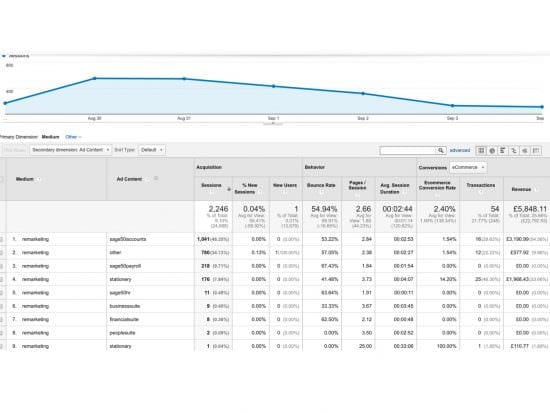
GA campaign tracking report

There are premium tools available that are focused on social media analysis and reporting. A good example is Crowdbooster, which provides analytics, automated insights and customised reporting dashboards. There is a 30-day free trial and plans start from $9 per month.

Social network analytics

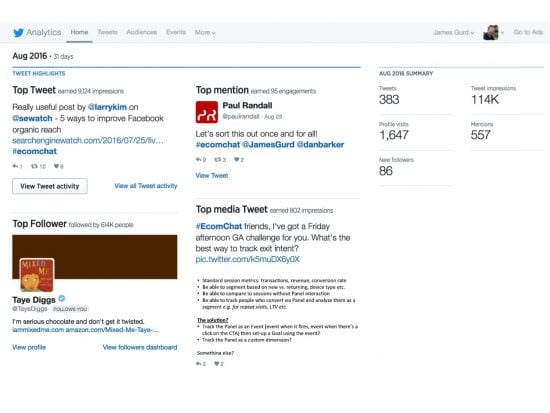
Each network provides its own free (and paid) analytics tools – use them as much as possible. Let’s use Twitter as the example, you can get the following info for free:

  • Monthly summary showing top tweets and overall activity rate
  • Tweet level data including impressions per day and top tweets based on impressions and engagement
  • Audience demographic breakdown e.g. male/female split
  • Twitter card usage data

Twitter analytics data

Planning tools

You need to understand your audience, and learn what content resonates best with them and who is out their already sharing popular content for the topics that are most relevant to your business and products/services. There are several handy research tools you can use.

Buzzsumo/Audiense

Free option? Yes
Pricing From $99 per month
Free trial option (for paid version) 14 days

These are great for audience analysis. You can research by topic and learn what content and which publishers are the most active and popular based on social engagement metrics.

Let’s use Buzzsumo as the example, a tool I’ve used personally myself and found it to be incredibly useful with a simple interface. I’ve used it to:

  • Research content topics for a client and drill down into key themes and sub-themes to find out what has the most activity
  • Learn which publishers are active and how much engagement they get with their content
  • Discover key influencers (brands, bloggers, journalists etc.) who align with key topics and see how much reach each one has
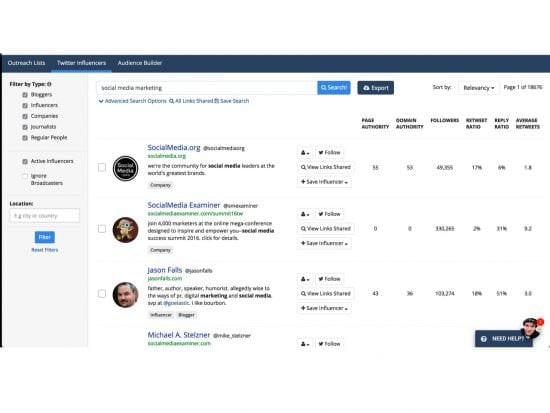
Buzzsumo content search

I’ve used this for complex B2B projects like legal services, as well as high street retail. To do any meaningful level of analysis, you really need to switch to the paid version, which gives unrestricted searches and exportable data.

URL shortener e.g. Goo.gl

Enables URL shortening to ensure your content is focused on the message, not the URL.

Bit.ly used to be the #1 choice for URL shortening but the news that it partnered with Vigilink to effectively add affiliate tracking to all shortened links, dampened enthusiasm amongst marketers.

With freemium tools like Bit.ly, branded domains can be purchased with an enterprise subscription, which also gives you access to enhanced features such as mobile deep links and dedicated support.

All links reporting is much deeper, so you can see link share data to help with content optimisation plans. Free tools like Goo.gl do provide data but it’s not as rich:
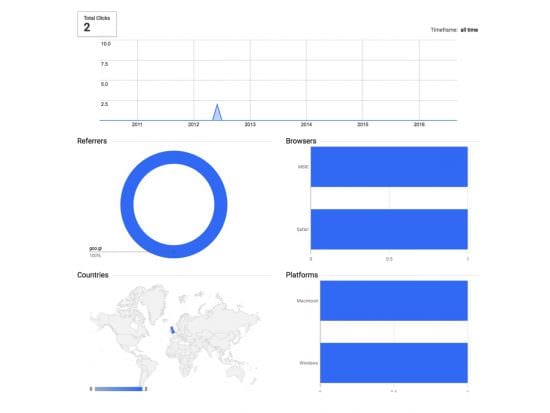
Goo.gl URL data

There are lots of free shorteners out there. For example, Hootsuite provides Ow.ly, which provides deeper link data when you pair it with Hootsuite.

Content tools

Social media is all about the content. Therefore you need tools that help you create and manage your content assets effectively.

When you start out, it’s fine to take a manual approach and create content to upload direct via social networks. However, as you grow and your publishing queue expands, it’s likely your demands will increase and you’ll need a smarter way to schedule and publish content. Below are examples of tools that help you curate visual content.

Everypost

Free option? Yes – pay with a tweet
Pricing From $9.99 per month
Free trial option (for paid version) 14 days

  • Available on iOS and Android to support mobile workflow
  • Pull in content from multiple sources and publish across social networks
  • Customise content to tailor to specific social networks
  • Collaboration via permission-based workflow to support team structures

There are network specific tools available, the value of which depends on how active you are on each network. Let’s look at one example.

Tailwind

Free option? No
Pricing From $9.99 per month
Free trial option (for paid version) Yes (based on activity threshold)

This is the leading solution for visual content scheduling and publishing on Instagram and Pinterest. Positioned as ‘smarter visual marketing, it allows teams to manage content calendars, collaborate across multiple team members and has a small business packages, as well as upgrade options for enterprise customers.

Management tools

Ok, so you’ve created your content, sorted your links and got your tracking in place. Now you need a way of managing your updates and ongoing communication with followers. Step up the social media management dashboards…

Tweetdeck/Hootsuite

Free option? Yes
Pricing From $7.99 per month (Hootsuite)
Free trial option (for paid version) 30 days (Hootsuite)

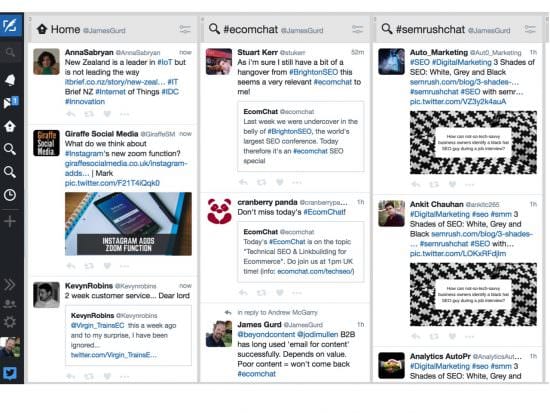
They provide activity dashboards to show what’s happening across your social networks, with the primary focus on Twitter (Tweetdeck only covers Twitter). Key features include:

  • Set-up single access or multi-access team accounts e.g. more than 1 person can tweet from your handle
  • Add multiple Twitter accounts (great if you’re a freelancer working with multiple clients)
  • Create multiple streams so you can follow different conversations e.g. I have a column for my #EcomChat network
  • Schedule posts and automatically shorten URLs
  • Quickly RT, like or reply to tweets
  • Direct message one or more followers

Tweetdeck custom dashboard

Buffer

Free option? Yes
Pricing From $10 per month
Free trial option (for paid version) 30 days

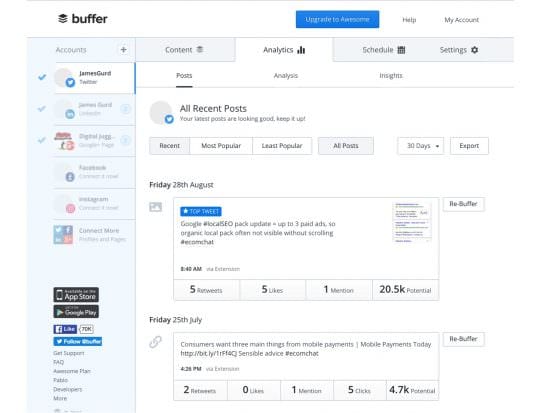
This helps you schedule all your social updates and create publishing queues. It has some neat features:

  • Set different publish schedules and velocity for each social network e.g. post to Twitter 3x daily, only post to Facebook 1x daily
  • See key social metrics fro each post e.g. # RT, likes and mentions for each tweet
  • Sort by popularity

Buffer dashboard

To access the detailed analytics and features like data export, you need to upgrade to the business package ($99 per month)

You can of course invest in other scheduling and publishing tools. Agora Pulse is a good example, offering free tools (I like the Twitter analytics report card) and a monthly subscription service from €49 per month, with a free trial option. Some of the cool features:

  • User profiling to identify ambassadors and influencers
  • Competitor analysis for Facebook and Twitter
  • Integration with Facebook apps e.g. run contests
  • Team workflow to assign and manage tasks across multiple users

Screenshot: Agora Pulse Twitter report card
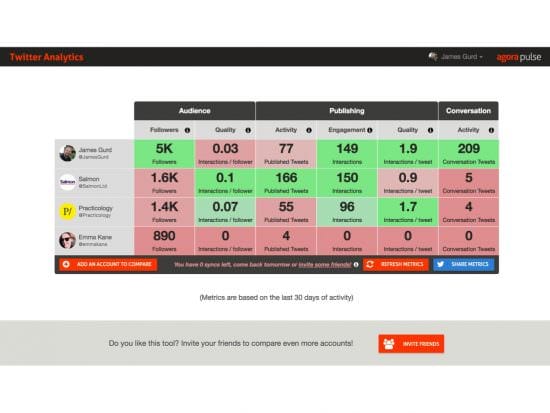
Agora Pulse report card

For heavier users such as agencies with multiple clients, tools like Sprout Social have been highly recommended to me, though I’ve not used personally. Pricing starts at $59 per user per month with a free 30 day trial.

IFTTT

Possibly the coolest and most flexible tool on the block, IFTTT is a free community that lets you create recipes for event-based triggers to automate social marketing.
For example, there’s a recipe to automatically share new Instagram photos as native Twitter photos.

You can create a new recipe using a simple process and choose triggers and actions from the wide range of integrations that IFTTT supports. I’ve got a simple recipe that sends a DM to my Twitter when a new person subscribes to our EcomChat email group.
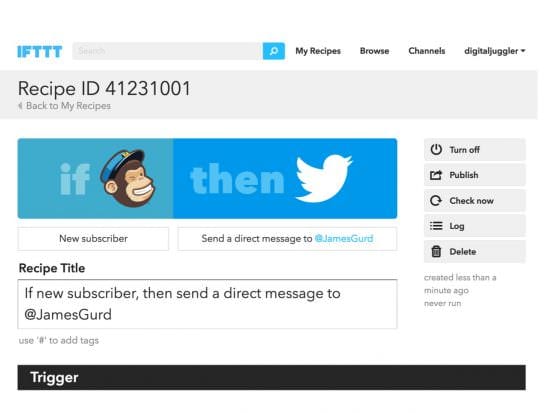
IFTTT recipe example

Your thoughts, comments and personal experience

So this is step 9 in the Smart Insights 12 step series on social media strategy and planning.

Did you find it useful?
What tools do you use to help deliver social media marketing? What mix of free and paid tools works for you?

Please join in the discussion and share your experience in the comments field at the bottom of this page.

Keep an eye out for next month’s article, “Handling complaints and negative PR via social media”.

Missed the previous articles? Catch-up here:

  1. 6 reasons why you need a social media strategy
  2. How to create a social media strategy and plan
  3. Competitor analysis for social media strategies
  4. Understanding the role of organic and paid social media
  5. Creating a social media content strategy and plan
  6. Aligning social media with other marketing channels
  7. Resource planning for social media
  8. Reporting for social media

Thanks
James



from Blog – Smart Insights http://www.smartinsights.com/social-media-marketing/social-media-platforms/social-media-marketing-toolkit/

via Tumblr http://euro3plast-fr.tumblr.com/post/151009015249

Search Engines overtake Traditional Media on Trust [#ChartoftheDay]

Greater public trust in search engines only reinforces the importance of SEO

It’s the morning after the night before. For those political nerds this side of the Atlantic who stayed up well into the early hours to watch the debate between the two candidates to become the leader of the free world, I can only say well done.

Among the barbed questions, infantile bickering and rude interruptions, discerning observers may have noticed one thing missing. Objectively verified facts. Sure the candidates bandied around plenty of statistics, but sometimes what matters more is not the statistic but its source. And even is a statistic is technically correct, it may be incredibly misleading. For example Donald Trump’s repeated claim that 52% of African American’s are unemployed includes all those who are in school, college, staying home for childcare, volunteering or retired. Hardly everyone's definition of ‘unemployed’.

The fact a candidate to be president of the richest, most powerful nation on earth can engage in a debate with such a skewed attitude to 'the facts’ points to a major change in how we access media and who we as a society trust.

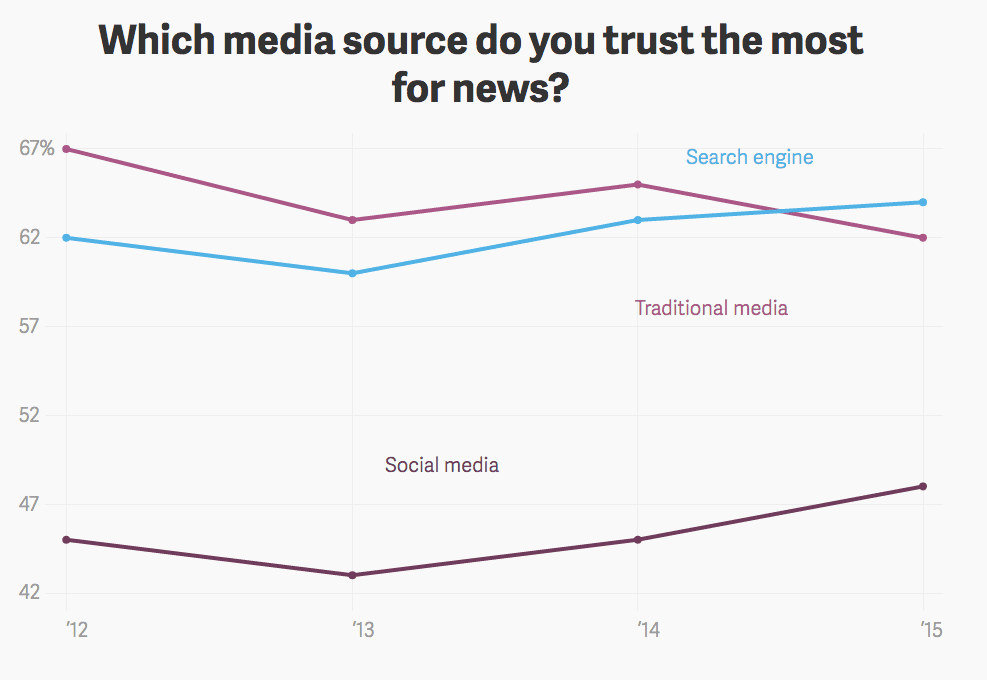
Today’s chart covers this, and reveals a very interesting trend. Search engines are now more trusted than traditional media providers, and social media is also gaining trust (albeit from a lower base). Social has now reached the 50% threshold, and looks set to gain even greater trust from users in the coming years.

Search engines besting traditional media points to their increasing power in all aspects of our daily lives, including the political. This only reinforces the need to develop a strong SEO strategy, although remember. With great power comes great responsibility.

trust chart newspapers social media search engines google

  • Source: Atlas
  • Data Source: Trust barometer


from Blog – Smart Insights http://www.smartinsights.com/search-engine-optimisation-seo/search-engines-overtake-traditional-media-trust-chartoftheday/

via Tumblr http://euro3plast-fr.tumblr.com/post/151007599364

The Secret to Winning in the Online Display World

How to avoid the common mistakes of programmatic advertising

Access to digital display ad inventory is becoming commoditized. It used to be that marketers and brands worked with publishers independently, leading to “handshake deals” that often left smaller players out in the cold.

Thanks to online trade desks and programmatic ads, this is changing. Most trade desks and platforms cooperate, and with the democratization of ad inventory, marketers and competitors operate on a relatively equal playing field.

It’s great that the playing field is equal, but that doesn’t mean marketers can mix a martini and call it a day just yet. The failure or success of your campaigns is ultimately up to you, and there are plenty of obstacles to pay attention to. And as with most things in life, you as a marketer need to play an active role in your media buying to guarantee you’re getting the best results.

The Hangover

Traditional trading desks and display advertising platforms come with their own list of headaches before you can even add ice to your drink. Here are just a few:

  • Margin extraction: Platforms, or players within those platforms, are taking cuts of the ad spend, which ultimately reduces the effective buying power of the advertiser. Every platform, system, and middleman — and there are a lot — that stands between the advertiser and the audience lowers campaign effectiveness.
  • Lack of verification: As much as some people like to compare trading internet advertising with stocks and bonds, there’s a big difference. If I buy a share of The New York Times from a broker, I know that I own a share of The New York Times.
  • Ad fraud: At this point, display advertising is not that transparent. Even on the most reputable platforms in the industry, there’s a chance that if I buy an ad on nytimes.com, that ad could show up on a completely different website. There are many new verification systems springing up — like Google and AppNexus — but nothing is perfect yet.

If this sounds like you should just leave your trading desk or throw in the digital marketing towel, don’t. But don’t assume it’s a big competitive advantage, either. The real secret to winning in this world is control.

Taking Back Control

Remember, there are a lot of good things about the programmatic system of media buying. The democratization of inventory means small entities can bid on premium space, and the automated systems allow marketers to make changes on the fly.

To avoid throwing the proverbial baby out with the bathwater, make sure you’re employing a few strategies to maintain control of your campaigns:

1. Ad Verification

Believe it or not, even on the best platforms, there is a risk of your brand running on bad websites or places where ads are never seen by the consumer. Many exchanges are rapidly improving, but they’ve mostly been slow to provide tools for marketers to monitor this.

As a result, it’s very important to use an independent, third-party platform to ensure ads appear on intended sites, reach targeted audience, and stays true to campaigns. Several companies now offer this service, including AdXpose, Google Attribution 360 (formerly Adometry), Adsafe, and Double Verify.

2. Attribution Modeling

When you’re spending significant amounts of money across several different advertising channels, it becomes challenging to measure and attribute customers to the ad spend. Platforms like to make it sound cut and dry, but if a consumer sees four of your ads on four different websites and becomes a customer a few days later, who gets credit?

Because all of those platforms will want the credit, you need an independent attribution modeling tool to fairly assess your return on ad spend and ad effectiveness. These tools establish rules that determine how credit for sales and conversions are assigned, making it easier for you to know when your money is effective.

3. Dynamic Creative Optimization

Because ad inventory is so easy to come by, the smartest marketers are now thinking beyond where they place their ads and how they pay for them. Strategies like dynamic creative optimization (DCO) use data from your media buying systems to optimize ads for a given user based on your return on advertisement spending.

DCO is best used for large campaigns that require direct response. This makes testing so many options make more sense because the potential impressions served are so great.

Increasingly, marketers, brands, and even advertisers are beginning to use third-party tools to take control of media buying. This is a great thing because, despite how it proclaims to be open, transparent, and programmatic, this industry is still new and working out some of the kinks.

By using independent tools and technologies, marketers are able to get valid second opinions on how their dollars are being spent, which helps to maximize campaign effectiveness and reach those all-important key performance indicators. And with that, marketers can sit down for the evening with their drinks in hand.


from Blog – Smart Insights http://www.smartinsights.com/internet-advertising/internet-advertising-strategy/secret-winning-online-display-world/

via Tumblr http://euro3plast-fr.tumblr.com/post/151003273614

Apple Just Released iOS10: Here’s What Marketers Need to Know!

Apple recently released the highly anticipated iPhone 7 — and with it, a new operating system in iOS10. Both have been the source of much speculation in recent months. Now that the features of iOS10 have been released officially, it’s time to understand what that means for your brand.

Marketers should consider how they can utilize new features, enhancements, and services to best serve their consumers. Normally, this means rethinking the user experience, doing extensive testing, and considering the implications of platform changes on your overall mobile app and marketing strategy.

New iOS10 Features
Naturally, understanding the new iOS 10 features is the first step toward integrating them into your digital-marketing strategy. I’ve chosen to highlight a few major enhancements that marketers should consider to increase the quality of personalized, targeted, and relevant experiences — the experiences customers want. So, without further ado, let’s examine not only the new features made available through the iOS10 update, but also how marketers can use these new features to enhance their customers’ experiences.

1. Messaging
Messaging has received what is probably the biggest overhaul in iOS10. Push and other messaging features that iOS offers have always been vital tools for improving user engagement. In this iteration of iOS, Apple has added audio and video support for push notifications that users can access from their lock screens. Not requiring users to unlock their phones increases both the likelihood that consumers will pay attention to their messages and the window of opportunity for catching their precious attention. Where consumers may have become distracted previously after unlocking their phones, prioritizing the notifications they wanted to check first, they can now address notifications directly from their lock screens.

2. Mail App
The mail app now offers a simple way to unsubscribe from marketing emails. Once you have an unsubscribe button integrated within the mail app, it becomes incredibly easy for customers to drop out of your sales or conversion funnels. This makes having a personalized email experience that offers relevant content more important than ever before. If your content seems irrelevant to your users’ lives, they can now opt out with a literal click of a button.

3. App Store Update
Though not a platform update per se (but closely related), the iOS app store will soon begin showing pay-promoted apps on search, meaning app store search results will feature one sponsored app at the top. Since the app store is still the best way for users to discover your apps, this is a huge opportunity to enhance app findability. If your app can land that coveted position as the top result — even if achieved through purchasing paid advertising — it could provide a sizeable advantage for your brand. This app store update is one that’s simply critical for marketers to be aware of.

4. Watch OS3 and Apple Watch Series 2
The new Watch OS3 and Apple Watch (Series 2) supports GPS within the app as well as in-app payments via Apple Pay. It also lets you unlock your Mac, call 911, and control HomeKit-enabled devices. These features are making the watch more applicable for consumers by providing them with useful experiences.

While all of this is great for consumers, what does it really mean for marketers? Ultimately, it means that Apple is providing a speedy, feature-laden, and increasingly independent wearable platform. In the past, marketers have struggled somewhat to make the Apple Watch part of their core marketing plans. These new features should give marketers more room to deliver relevant services to their customers. As this wearable platform matures, marketers will be very glad they got in on the ground floor!

5. Revenue Split With App Subscriptions
Apple also announced changes regarding how it splits revenues on apps that deliver services via subscriptions. Apple has traditionally taken 30 percent of these recurring charges. However, they will start taking only 15 percent of ongoing subscriptions after the first year. They will also begin allowing all app categories to sell subscriptions, possibly making it more compelling for marketers to deliver apps with fresh content and services. Generally speaking, the additional margin could also increase the possibilities for subscription-app models to become profitable revenue streams for brands.

6. Expedited App Reviews
Apps can now be pushed into the marketplace in a shorter timeframe — sometimes, in as little as two days. Therefore, when creating a marketing plan for a new campaign, product, or brand, you can more easily — and much more quickly — consider apps as well as updates to existing apps. This updated timeframe means your mobile app-marketing strategy can be much more agile.

7. Siri Kit
Siri has been opened up to allow integrations with third parties. Just like with the new Apple Watch, this announcement may not be applicable to all. However, it’s important to understand what you have here, as consumers begin to increasingly prefer voice-driven interfaces. With the Siri Kit, Siri can now be integrated into existing apps (see Apple’s demo on Uber or other examples here). This integration seeks to save users time and effort, potentially increasing brand loyalty over time.

iOS10 for Marketers — The Bottom Line
There are certainly potential benefits — but also risks from misuse, saturation, and misalignment with a broader brand strategy. The bottom line is that marketers should continually improve their mobile apps and stay informed of key platform changes and opportunities. When they do so, they can make the most of every feature available to them, and ultimately, provide the best customer experiences imaginable.

The post Apple Just Released iOS10: Here’s What Marketers Need to Know! appeared first on Digital Marketing Blog by Adobe.


from Digital Marketing Blog by Adobe https://blogs.adobe.com/digitalmarketing/mobile/apple-just-released-ios10-heres-marketers-need-know/

via Tumblr http://euro3plast-fr.tumblr.com/post/151001701474

Monday, 26 September 2016

Few businesses successfully integrating digital and traditional marketing [#ChartoftheDay]

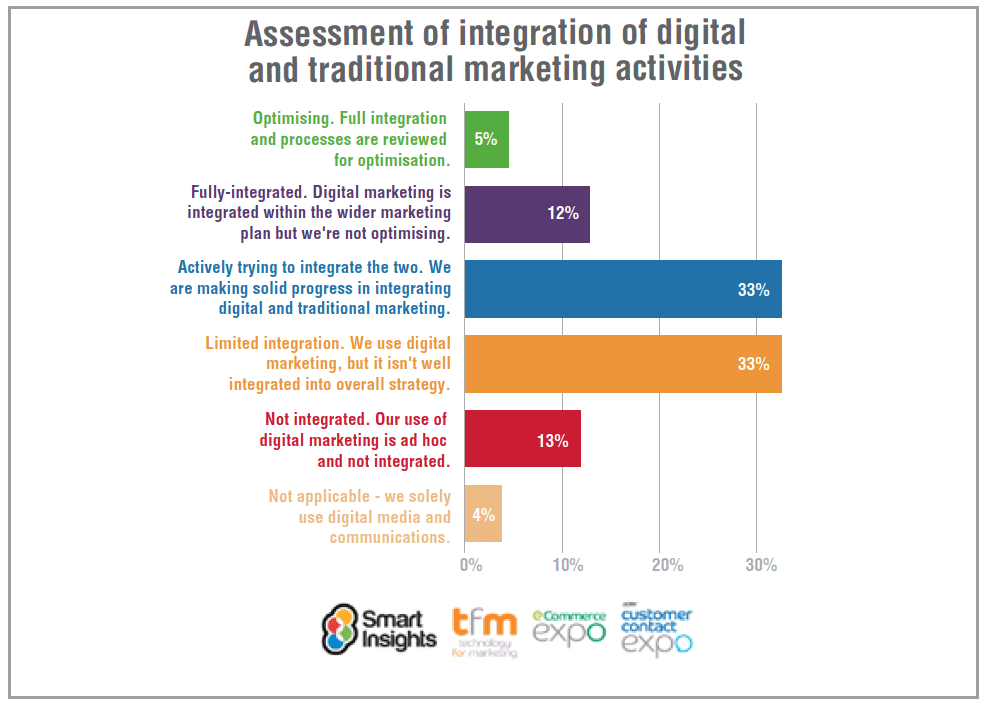
Many businesses are trying to integrate digital and traditional marketing, but only 1 in 20 have achieved full optimisation.

Today’s chart of the day comes from our 2016 research into managing digital marketing, which asked 1096 marketers from around the world about their experiences of managing the challenges of digital.

One particularly important finding from the report was the poor state of integration between digital and traditional channels. There can be no doubting that this is important. Customers increasingly spend their time online and assess content digitally, making digital marketing ever more important. Yet some brands are starting to think traditional channels have become under-rated as a result and starting to question if they’ve over-invested in digital.

Whether one channel is more important than the other is an irrelevant question; clearly both are of immense importance and which one is more important will vary between businesses. The key thing is that they should be working together to drive the same message and goals. Yet we found 50% of businesses have no or limited integration.

And of those with some integration, most are merely at the stage of trying to integrate them but have not yet fully achieved it. Only 5% report having fully optimised the processes, so there is clearly a long way to go.

intergration-of-traditional-and-digital-marketing-activities


from Blog – Smart Insights http://www.smartinsights.com/digital-marketing-strategy/businesses-successfully-integrating-digital-traditional-marketing-chartoftheday/

via Tumblr http://euro3plast-fr.tumblr.com/post/150962882189

Introducing our RACE analytics dashboard to help stay on top of critical marketing KPIs

Use our new RACE analytics Google Sheet to see your key marketing metrics at a glance

For Marketing, Digital marketing or ecommerce managers, the first week of the month is always a frantic one launching new campaigns, monthly dashboard reviews and on top of that you need to report the performance of your marketing to the internal stakeholders (the boss). Hopefully, it’s a good news story, but if it isn’t, that just adds to the workload, identifying what went wrong and putting plans in place to turn things around.

This is where you need to practice the art of analytics, to quickly create a report or dashboard with a subset of key metrics covering all marketing activities in an easy to understand format for rapid review and recommendations for upcoming activities?

But how do you create a dashboard for reviewing digital marketing performance to compare different time periods such as monthly, weekly, quarterly or annually. While Google Analytics has many, many metrics and many many reports, consolidating them into the measures you need for a dashboard showing a marketing funnel can be a challenge. Sure, you can browse the Google analytics custom dashboard gallery, but you will find that many of these don’t cover the ‘full-funnel’ needed for a strategy or business level review, instead they tend to focus on tools to help with tactics like SEO or social media.  You can also use the

This is where the Google Analytics API and the Google Sheets add-on comes into play

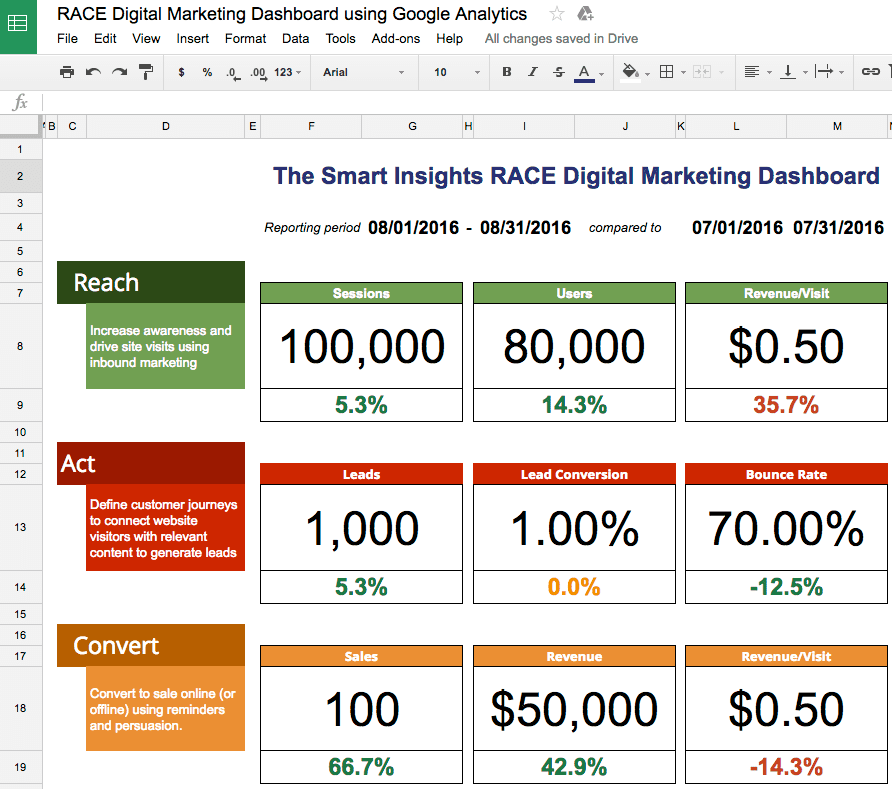
The purpose of the Smart Insights dashboard is to help managers to complete a regular weekly or monthly review of the current effectiveness of their digital marketing using Google Analytics with Google Docs Spreadsheets. We use this combination ourselves in our monthly reporting! The dashboard makes it easy to compare digital marketing performance through time with a focus on the key digital marketing measures across the customer lifecycle or marketing funnel defined across the Smart Insights RACE planning framework. For example, you can compare year-on-year or compared to the previous reporting period.

google-analytics-api-funnel-reporting-dashboard

The Smart Insights RACE framework used in all our member resources was developed to help digital marketers plan and manage their activities in a more structured way since we found that many don’t have a digital marketing strategy with clear objectives and KPIs (key performance indicators).

By reporting on just four metrics for each of the Reach, Act, Convert & Engage parts of the funnel you can measure the key areas of your digital marketing plan to see which are working or require attention. In addition to overall visits, leads and conversion, the dashboard also includes key low-cost channels used by many businesses of organic search, social media and email marketing.

How to use the RACE dashboard

What you will need:

  1. A Google account to open and make a copy of the spreadsheet
  2. The Google Analytics spreadsheet add-on within Google Spreadsheets click here
  3. A Google Analytics account
  4. Your Google Analytics ID

How to get the dashboard

Expert members can get the dashboard by visiting this page.

Please then follow the instructions on the Google Sheets Read page, starting by making a copy. Here are some visual examples to help you.

1. NB. Ensure you use the same Google Account for Google Analytics and Google Sheets.

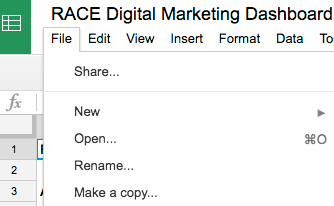
2. Make a copy of this Report - you do this from the “File” menu of Google Sheets > “Make a copy” option

When you first open you will see a blue box, top left, saying the spreadsheet is 'Read-only’

2016-09-26_10-16-02

The first thing you should do is to 'Make a copy’ via the file menu, which you use for your internal use.

2016-09-26_10-14-28

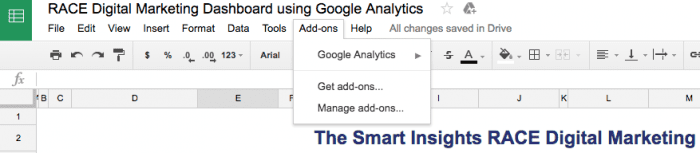
3. Install the Google Analytics Add-on for Google Sheets - Add-ons > Get add-ons in the Sheets menu.

This is how it will look once it is set up. When you first look, Google Analytics won’t be there so you will have to add it using the 'Get add-ons’ option.

2016-09-26_10-13-04

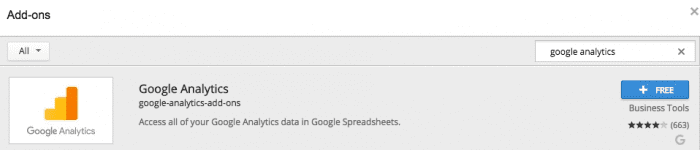
Choose 'Get add-ons’ and then search for Google Analytics - you want this one which offers to 'Access all of your Google Analytics data in Google Spreadsheets’ - it’s available from Google.

2016-09-26_10-10-14

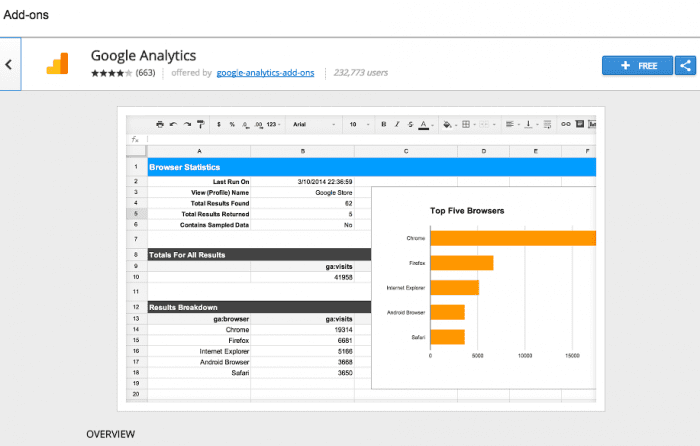
When you click on it you will see these details.

2016-09-26_10-10-44

Next click the + Free button and it will be available.

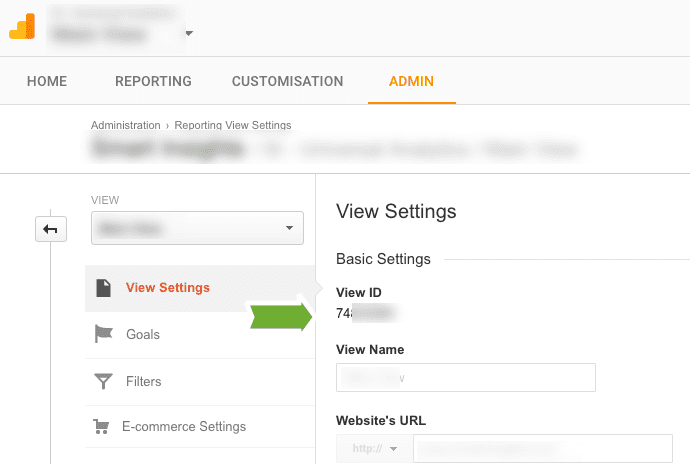
Next, the hardest part which is to find your Google Analytics 'View ID’

4. Place your Google Analytics View ID on Cell B3, Tab “++Configure Report++”
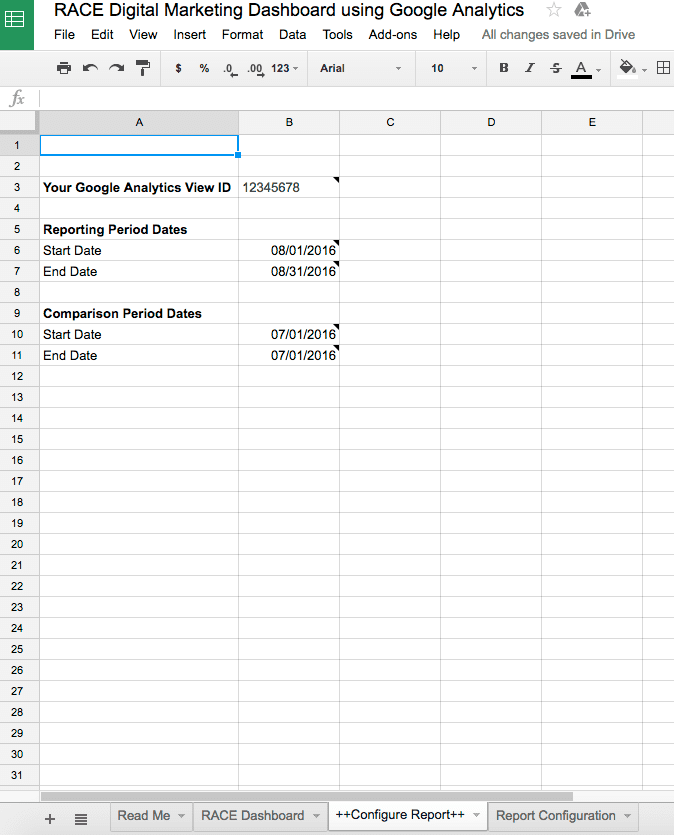
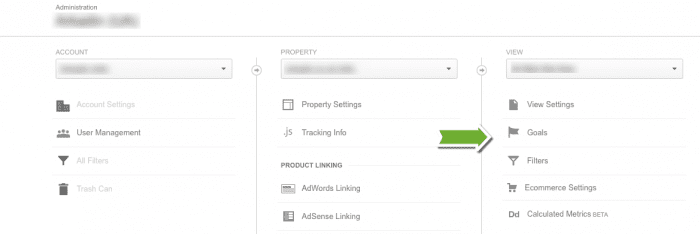
5. Find your GA View ID in analytics to customise it to your business
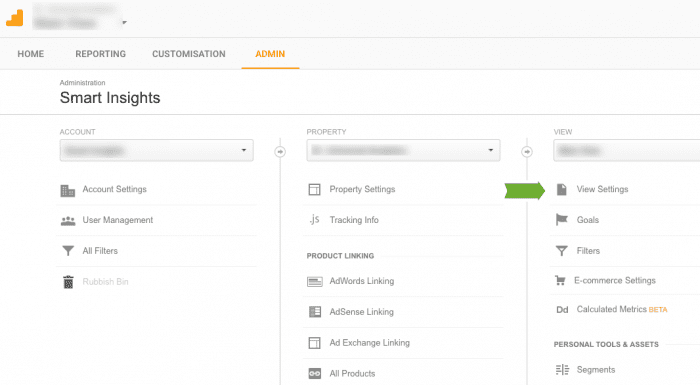
- Sign-in to your Analytics account.
- Select the Admin tab.

2016-09-23_16-26-56

- Select an account from the dropdown in the ACCOUNT column.
- Select a property from the dropdown in the PROPERTY column.
- Under View , click View Settings"
2016-09-23_16-28-486. Place your Google Analytics View ID on Cell B3, Tab “++Configure Report++”
2016-09-26_10-26-53

7. To calculate and display 'Leads’ & 'Sales’, identify which GA Goals are most relevant to you in your view and replace the goal numbers “ga:goal1Completions’ (for Act conversion goal) and ”ga:goal2Completions’ (for Convert goal) in Tab “Report Configuration” Cell B8, C8, D8 & E8

You can find out the Goal numbers by clicking on the Admin tab we mentioned at step 5 and by then clicking on the Goals option under view.

2016-09-26_10-35-35

8. Add your reporting dates to Cells B6, B7, B10 & B11.

For example to compare two consecutive months or year on year changes.

You can see an example of this in Step 6 above where we are comparing two months.

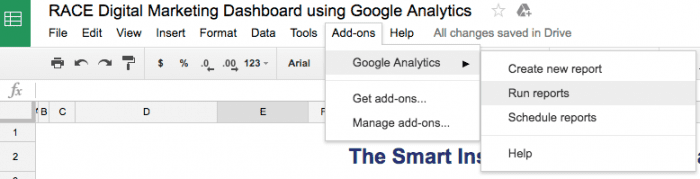
9. Now you are ready to run your first report in the Sheets menu! Simply select “Add-ons” on the Google Sheet > “Google Analytics” > “Run Reports”

2016-09-26_10-40-11

Congratulations - The example data on 'RACE dashboard’ sheet should now be updated. If not, carefully check each of the steps above.

Once set up the whole process is more straightforward if you are simply using one Google View / Account. You will just need to repeat steps 8 and 9.

But is my information secure?

Yes!- This dashboard is built using the popular online Google Docs Spreadsheet Sheets to report on business marketing performance using Google Analytics data from your Google Account via the Google Analytics API. This data is only available to those in your business who can sign in with their username and password to have access to the account and know the ID of the website property and view. It is not available to Smart Insights or anyone who doesn’t have this information since the same Google Analytics and Google Docs account must be used.


from Blog – Smart Insights http://www.smartinsights.com/goal-setting-evaluation/web-analytics-strategy/introducing-race-analytics-dashboard-help-stay-top-critical-marketing-kpis/

via Tumblr http://euro3plast-fr.tumblr.com/post/150961716169